


Routing the
unroutable inbox
Turning one overwhelmed messaging queue into a system advising teams can actually run.
This immigration-compliance platform is where international student advisors live in SEVIS records, F-1/J-1 status, OPT, travel signatures. Its messaging feature had a single shared inbox that every student message poured into. I led the redesign that introduced configurable, routed inboxes, and I ran the whole arc, discovery to engineering-ready handoff with AI as my working partner at every phase.


MY ROLE
AI-led Product Strategist
UX architecture · interaction · spec
SURFACE
Admin settings + advisor messaging + Student and Partner experience
AI MODELS USED
Claude Co-Work + ChatGPT
How this was made
An AI-led practice, not an AI-assisted one
Most "AI-assisted" work bolts a model onto the polish step. I ran AI as the connective tissue across the entire product-thinking pipeline and held the judgment, the domain trade-offs, and the final calls.
01 Discover
Synthesis
Pulled the real picture from Jira, design-system docs, and existing screens.
02 Define
Workflow logic
Mapped routing rules, system states, edge cases, and roles before any UI.
03 Architect
IA & flows
Settled the information model: inbox config, visibility, catch-all, assignees.
04 Prototype
Interactive build
Coded working, token-accurate prototypes, real validation, real states.
05 Hand off
Spec & AC
Acceptance criteria, microcopy, a11y rules, and QA checklist for eng.
The model accelerated the mechanical work, reading, drafting, scaffolding code. The strategy stayed mine: deciding that routing consolidation came before features, that the catch-all could never be deletable, that students should never see an internal inbox name.
01
The queue that couldn't scale
An international student office handles visa status, SEVIS updates, OPT/STEM eligibility, and travel signatures, high-stakes, deadline-driven, and legally sensitive. Every one of those messages landed in the same undifferentiated inbox.
1
shared inbox for every message type, advisor, and program
3
overlapping routing models already confusing admins
0
way to scope a conversation to a team or product line
320+
live threads across topics in the test org alone
A travel-signature request from a master's student leaving in two weeks sat in the same pile as a routine address change. There was no way to send "OPT & STEM" questions to the specialists who handle them, no way to keep partner-school correspondence out of the student-facing flow, and no safe default for the messages that fit nowhere.

02
The strategic call that came before any screen
Discovery surfaced the trap: Multi-Inbox wasn't a blank-slate feature. It would sit on top of three routing concepts that already existed and already conflicted. Shipping a fourth would compound the confusion.
Existing · A
Assignee routing
Threads manually assigned to an individual advisor after they arrive.
Existing · B
Permission-group access
Who can see which conversations, governed separately by role.
Existing · C
Product scoping
Which of the 4 product lines a message belongs to, set elsewhere again.
Recommended UX Strategy
The highest-leverage move was to consolidate routing into one mental model, inbox as the single container that carries assignees, visibility, and product scope together so Multi-Inbox absorbed the existing concepts instead of adding to them. That decision shaped every screen that followed and prevented downstream rework across three related epics.
03
Decisions worth defending
Each of these started as an edge case the AI helped me enumerate, then became a product principle I committed to and specced.
D1. Safe defaults · System state
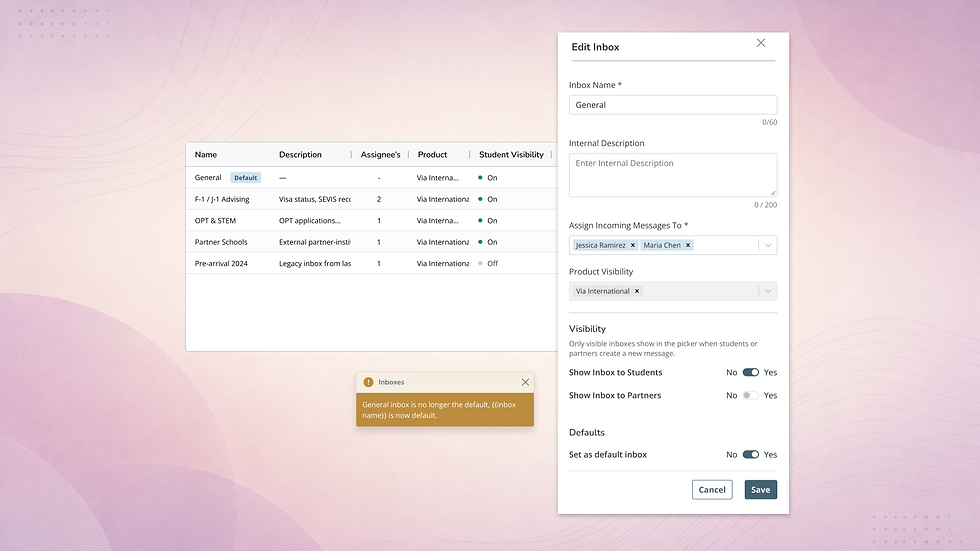
There is always exactly one default inbox
If a message isn't explicitly routed, it has to land somewhere. The system guarantees exactly one default inbox per org that receives anything not routed elsewhere and every legacy thread gets assigned to it at migration time, so nothing pre-release is left without a home.
RISK IF IGNORED
Unrouted or un-migrated messages fall into a void, the one failure mode a compliance tool can't have.
IN THE BUILD
Migration rule: all pre-release threads assigned to the org default inbox. Default designation can move, never disappear.
.png)
D2. Visibility · Two independent audiences
Student and partner visibility are separate switches
Each inbox carries two independent flags, show-to-student and show-to-partner, that can be on, off, or either alone. An inbox option can be visible or hidden from Students or Partners (e.g. Faculty Member).
INTERNAL CONFIGURATION
Options include Show to Student and Show to Partner toggle.
STUDENT / PARTNER INBOX
Inbox name ( e.g. F-1 / J-1 Advising), appears in the student/PARTNER picker the moment the flag flips On
D3. One vocabulary · Five surfaces
The same words everywhere, by design
Inbox, default inbox, visibility, assignee, product, I locked one set of names to be used identically in code, copy, and UI across all five surfaces. A thread's inbox chip on the admin list reads the same as its slide-out subtitle and the student's view of it, so routing context never contradicts itself as people move between screens.
04
One feature, five surfaces, zero new modules
Multi-Inbox wasn't a screen, it was a behavior layered across the entire messaging experience. I scoped the change surface by surface so admins, students, and partners each got exactly the routing context they needed, all sharing one component set and one vocabulary.
Org Settings > Inboxes
Org Settings · Inboxes
The one brand-new management surface: list view plus a create/edit slide-out where admins name inboxes, assign teams, and set the two visibility flags. Edit is the only row action in v1. Prototype created using Claude Co-Work.

Inbound > Messages
Admin Messages
Gains an inbox filter, a per-thread inbox chip (info-tinted for the default inbox, primary for named ones), and a one-click "Move to Inbox", which reassigns to unassigned if the advisor isn't a member, with undo.ly row action in v1.

Student Profile > Messages
Student Profile · Messages tab
Full behavior parity with Admin Messages, scoped to one student. Moving a thread here updates it everywhere it appears, the main module and the student's own portal view.

Student / Partner Portal > Messages
Student / Partner Portal · Messages
The student-facing compose flow gains an inbox picker as step one but only when the student can see more than one inbox. A single visible inbox is pre-filled silently, so most students never face a choice they can't make.

Each surface was handed off as a self-contained section, route, what's new, front-end work, acceptance criteria, and edge cases so any engineer could pick up their area against the linked prototype created in Claude.
What this work argues about the evolution of UX
AI moves at the speed of drafting.
The UX Designer moves at the speed of deciding.
The leverage wasn't generating UI faster. It was running discovery, definition, architecture, prototyping, and handoff as one continuous loop, using AI to read everything, draft everything, and scaffold working code, while I owned the calls that actually carried risk: that routing had to be consolidated first, that a compliance tool can't lose a message, that the system had to be designed to scale across markets it wasn't even shipping to yet.
